Build a point-of-sale application
Use this roadmap when your point-of-sale (POS) or kitchen system receives orders from Otter and owns the menu catalog. A certification-ready POS flow ingests each order once, tracks status changes, and publishes the POS menu into Otter through Menus Manager.
Confirm the final requirements for your product with your Otter representative before you submit for certification.
Before you begin
- Complete the shared readiness baseline.
- Configure signed order webhooks.
- Assign stable POS ids to menus, categories, items, modifier groups, and modifiers.
- Define how Otter order and menu states map to your POS states.
How it fits
The Orders: receive into your system guide shows the inbound order flow. Its existing order diagram remains the source for that flow.
Menu publication flow
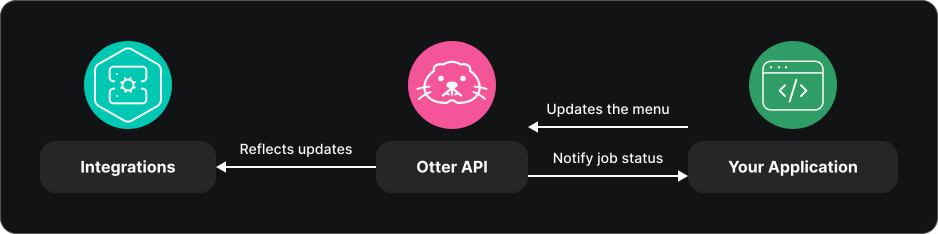
Implementation roadmap
1. Receive orders from Otter
Handle Orders creation (orders.new_order), validate the signature before parsing the payload, and create the order once in the POS. Follow Handle create events for acknowledgement and processing behavior.
Handle Order status update (orders.order_status_update) and apply transitions to the same POS order. Preserve unknown or out-of-order transitions for investigation instead of silently replacing the current state.
2. Publish the POS-owned menu
Use Menus Manager because the POS is the source of truth:
- Create or update the catalog with
POST /v1/menus. - Poll
GET /v1/menus/jobs/{jobId}until the job reachesSUCCESSorFAILED. - Follow Publish menus to a target and verify the target job succeeds.
- Use Suspend or unsuspend entities with the same stable entity ids, then republish so targets receive the change.
Do not use the Otter-to-target Menus flow as the POS catalog source in this scenario.
Readiness checklist
- New-order webhooks create one POS order when delivered once, more than once, or after a retry.
- Status events update the existing order and preserve a trace of every transition.
- Unsupported payloads fail visibly and retain enough context for troubleshooting.
- A POS menu upsert reaches a terminal asynchronous job state.
- Published menus match POS categories, items, modifier groups, prices, and availability.
- Suspending and unsuspending an entity uses stable ids and propagates after republishing.
- Webhook signatures, duplicate delivery, rate limits, and retryable API failures are handled.
Test before certification
- Receive a test order, acknowledge it promptly, and confirm the complete order appears in the POS.
- Replay the new-order event and verify that the POS does not create a duplicate order.
- Process status events, including a terminal state, and verify the correct POS order changes.
- Upsert a representative menu and poll until the job reaches
SUCCESS. - Publish the menu to one target, suspend an item, republish, then unsuspend and republish it.
- Submit an invalid menu payload and retain the failed job details for troubleshooting.
Evidence to collect
- Webhook ids and POS order ids for original, replayed, and terminal-state events.
- Logs showing signature validation, prompt acknowledgement, and asynchronous processing.
- Menu upsert and publish job ids with final
SUCCESSor expectedFAILEDresults. - Before-and-after evidence for one suspended and unsuspended menu entity.
- The shared evidence listed in Scenarios.
Common failures
| Symptom | Likely cause | Fix |
|---|---|---|
| Duplicate POS order appears | Webhook id or external order id is not used for deduplication | Store a stable deduplication key before processing the order |
| Event acknowledgement times out | POS work runs inside the webhook request | Validate, persist, acknowledge, then process asynchronously |
Menu job reaches FAILED | Invalid shape or inconsistent entity ids | Inspect the job error and compare the payload with the API reference |
| Publish target is missing | The store is not linked to the target service | Verify store pairing before publishing |
| Availability change does not propagate | Entity ids changed or the menu was not republished | Reuse upsert ids and publish after suspend or unsuspend |