Build an online food ordering application
Use this roadmap when your online food ordering (OFO) application is a marketplace or ordering channel that sends orders into Otter. A certification-ready OFO flow keeps orders, menus, hours, item availability, and storefront status synchronized for every connected store.
Confirm the final requirements for your product with your Otter representative before you submit for certification.
Before you begin
- Complete the shared readiness baseline.
- Configure webhook subscriptions for orders, menus, and storefront events.
- Define idempotency keys and status mappings before sending test traffic.
How it fits
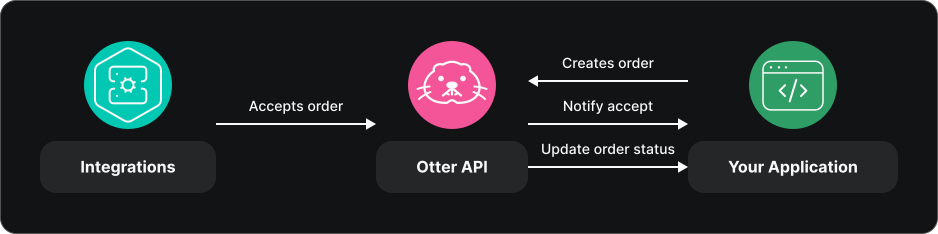
Order flow
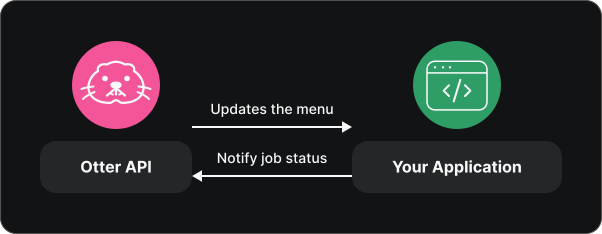
Menu flow
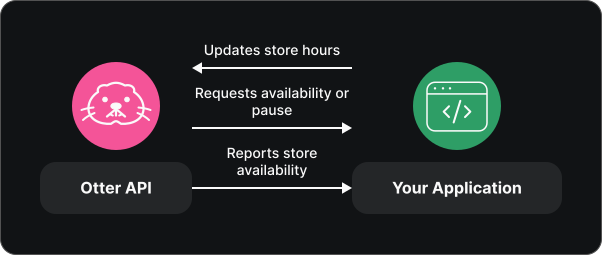
Storefront flow
Implementation roadmap
1. Send orders into Otter
Create each marketplace order with POST /v1/orders. Use stable external ids, preserve the returned order id, and follow Create an order for the required sequence.
Handle Order status update (orders.order_status_update) and the cancellation behavior described in Order lifecycle. When your workflow advances or cancels the order, call POST /v1/orders/{orderId}/status.
2. Apply menu changes
Implement the webhook and callback pair for each baseline menu capability:
- Menu Publish (
menus.menu_publish) andPOST /v1/menus/publish. - Menu upsert hours (
menus.upsert_hours) andPOST /v1/menus/hours. - Update menu entities availabilities (
menus.update_menu_entities_availabilities) andPOST /v1/menus/entity/availability/bulk.
Apply the change in your OFO before sending a success callback. Use Handle failed events when the target rejects the operation.
3. Keep storefront state aligned
Send store hours with POST /v1/storefront/hours. Respond to Get store availability (storefront.get_store_availability), Pause store (storefront.pause_store), and Unpause store (storefront.unpause_store).
Use POST /v1/storefront/availability when your OFO proactively changes whether a store can accept orders. See the Storefront overview for the complete sequence.
Readiness checklist
- A valid order is created once, even when your client retries a request.
- Order status and cancellation events update the correct order.
- Menu publish, hours, and entity availability changes reach the correct store and return the matching callback.
- Failed menu operations return actionable error information instead of a false success.
- Storefront hours and availability are configured before availability polling begins.
- Pause and unpause events change ordering availability and remain safe when delivered more than once.
- Webhook signatures, duplicate delivery, rate limits, and retryable API failures are handled.
Test before certification
- Create an order, move it through accepted, prepared, and fulfilled states, and verify every status event.
- Cancel a separate order and verify both systems reach the same terminal state.
- Publish a small menu, update its hours, suspend one item, and verify every callback.
- Configure storefront hours, test available and unavailable states, then process pause and unpause events.
- Replay one event from each domain and verify that no duplicate order or target-side action is created.
Evidence to collect
- Order ids and request ids for successful, canceled, and replayed orders.
- Webhook ids and callback responses for menu publish, hours, and availability.
- Storefront payloads and resulting open, unavailable, paused, and unpaused states.
- Signature-validation, duplicate-delivery, retry, and error-path logs.
- The shared evidence listed in Scenarios.
Common failures
| Symptom | Likely cause | Fix |
|---|---|---|
Store-scoped requests return 403 | The existing store connection is missing or the external id is stale | Reconcile the mapping in Connect to an existing store |
| Duplicate order appears | Request retry created a second business action | Use a stable external id and make creation idempotent |
| Menu callback reports success before the target changes | Callback is sent before target processing completes | Send success only after the OFO applies and verifies the change |
| Availability is rejected | Storefront hours were not configured first | Call the hours endpoint before availability operations |
| Events stop processing during a spike | Work is handled synchronously or without backoff | Acknowledge quickly, queue work, and respect rate limits |