Events and webhooks
How Otter notifies your app when something happens outside a REST call you started — and how you should respond.
REST is how you initiate work. Webhooks are how Otter notifies you of work that started elsewhere (restaurant accept, menu publish request, store pause, report ready, and so on).
REST vs webhooks
| REST (your app → Otter) | Webhooks (Otter → your app) | |
|---|---|---|
| Who starts | You | Otter or the restaurant |
| Typical use | Create an order, upsert a menu, pause a store | Status changed, publish requested, credentials needed |
| Auth | Bearer access token | Validate X-HMAC-SHA256 (see Authentication) |
| Response | HTTP status for your request | 2xx quickly; process asynchronously |
Most Integrations hubs use both.
Event lifecycle
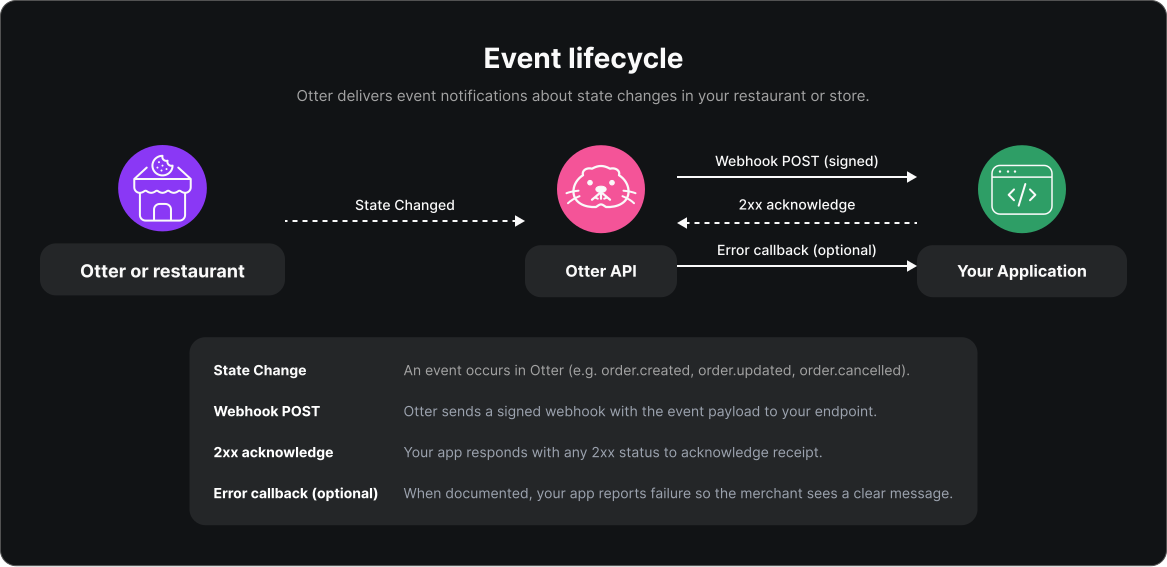
- Something changes in Otter (or a merchant action triggers it).
- Otter
POSTs a signed JSON payload to your registered HTTPS URL. - You validate the signature, return 2xx, and queue work.
- When a domain documents it, you may call an error callback so the merchant sees a clear failure (menus and delivery use this pattern).
Acknowledge quickly
- Return 2xx as soon as the request is accepted for processing.
- Do heavy work (DB writes, partner APIs) after the response.
- Non-2xx responses may cause Otter to retry; treat handlers as idempotent where the same event can arrive more than once.
Exact retry policy and payload shapes live in the API reference and each Integrations hub’s Events section.
Error callbacks
Some domains require an explicit failure report when your side cannot complete the work Otter asked for:
| Domain | Pattern | Start here |
|---|---|---|
| Menus | POST /v1/callback/error with event id + user-friendly reason | Report a failed menu event |
| Delivery | POST /v1/delivery/callback/error | Handle delivery errors |
Use a merchant-readable reason. Silent failures leave restaurants stuck with no message in Otter.
Security and registration
- Register HTTPS endpoints with your Account Representative (or via supported APIs where available).
- Each endpoint has a secret — validate
X-HMAC-SHA256on every request. Deep how-to and code samples: Keep webhooks secure.
Related
- Authentication — tokens outbound; webhook verify inbound
- Keep webhooks secure — HMAC algorithms and samples
- Quickstart — register webhooks
- Otter 101
Next
Implement signature validation (Keep webhooks secure), then subscribe to the event types listed on your Integrations hub Overview.