Otter 101
An intro to Otter for API partners — how restaurants, applications, and integrations fit together.
Otter helps restaurants run multi-channel operations: orders, menus, storefront availability, delivery, finance, and guest feedback. The Otter API lets your product (marketplace, POS, delivery network, back-office tool, and so on) exchange that data with Otter in real time.
You do not build “against a generic food API.” You integrate with a merchant hierarchy, scoped by store, driven by your application’s credentials, and kept in sync with webhooks.
Who builds on Otter
| Partner type | Typical goal |
|---|---|
| Marketplace / channel | Send orders into Otter; keep status and menus in sync |
| POS / kitchen system | Receive orders from Otter; update prep status |
| Delivery / logistics | Quote, create, and update deliveries |
| Ops / finance tools | Reports, payouts, reviews, loyalty |
Most live products use more than one domain under Integrations.
Merchant hierarchy
Otter models restaurants in three levels:
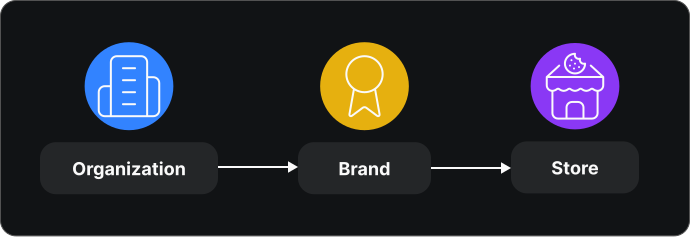
| Concept | Meaning |
|---|---|
| Organization | The merchant account a user belongs to |
| Brand | A brand under that organization (for example a concept or banner) |
| Store | A single restaurant location — the unit most API calls and webhooks act on |
When you onboard via the organization APIs, you browse org → brand → store and create a connection that maps Otter’s store to an id in your system.
Deep dive: Stores and connections (pairing paths, X-Store-Id, status).
Application
Your integration is registered as an application.
- You get an Application ID and client secret.
- Store secrets securely; never commit them to source control or expose them in a browser or mobile app.
- Scopes on the application control which APIs you may call.
Complete Quickstart with a test store before live restaurant traffic.
Store identity
Once a store is linked to your application, store-scoped requests use the X-Store-Id header, and webhooks carry store metadata for routing.
If a store is not linked, store-scoped calls fail even with a valid bearer token. Pairing options and details: Stores and connections.
Orders: two directions
Orders are the most common integration. Otter supports two complementary patterns:
| Pattern | When to use | Start here |
|---|---|---|
| Send into Otter | Your system is the source of truth (marketplace creates the order) | Orders (send into Otter) |
| Receive into your system | Otter (or another channel) creates the order; your POS/kitchen consumes it | Orders (receive into your system) |
In both cases, status moves through a shared lifecycle (accept → ready → fulfilled, or canceled). Your app and Otter exchange updates via REST and webhooks. See Order lifecycle.
Menus and storefront
| Domain | Role |
|---|---|
| Menus | Otter pushes publish / hours / availability events; your app applies them on a target channel |
| Menus Manager | Your app owns the catalog, upserts into Otter, then publishes to targets |
| Storefront | Hours, open/paused availability, pause and unpause |
Pick Menus vs Menus Manager based on who is the primary editor of the catalog. See Menus and Menus Manager.
Events: webhooks
REST is how you initiate work. Webhooks are how Otter notifies you of work that started elsewhere.
Validate signatures, acknowledge with 2xx, process asynchronously, and use error callbacks where a domain requires them.
Deep dive: Events and webhooks. HMAC samples: Keep webhooks secure.
How an integration fits (recap)
- Application authenticates to the Otter API.
- Stores are linked; requests use
X-Store-Id. - You call REST for actions you start; you receive webhooks for events Otter or the restaurant start.
- You implement one or more Integrations hubs for your product.
Next
- Quickstart — Credentials, first call, store, webhooks
- Authentication — API tokens and webhook verification
- Events and webhooks / Stores and connections — Core Concepts depth
- Overview — Choose an Integrations hub
- API reference — Payloads, enums, and scopes